Local control center
The system runs from the Mac mini and local Hermes workspace, with click-to-run launchers, dashboard surfaces, and separate project archives.
- Local files stay inspectable.
- Workspaces stay separated by project.
A local-first AI operator running on my Mac mini: part command center, part build partner, part continuity layer for research, websites, browser QA, scheduled checks, and project handoffs.
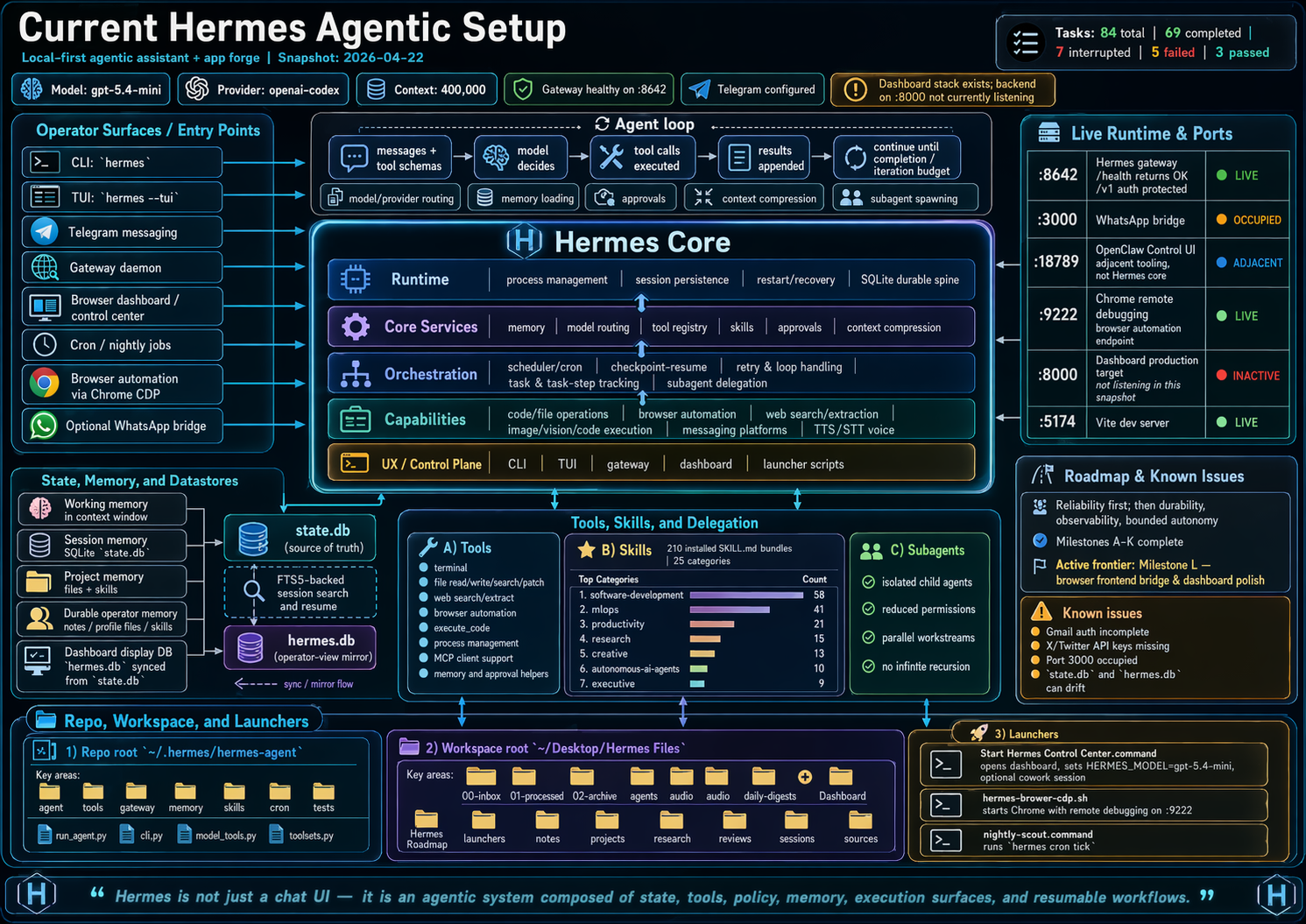
What it is
Hermes sits between intention and execution. It can inspect files, use the browser, run tests, manage GitHub workflows, schedule follow-ups, and keep context across sessions.
The system runs from the Mac mini and local Hermes workspace, with click-to-run launchers, dashboard surfaces, and separate project archives.
Hermes can use tools rather than just generate text: terminal, files, browser automation, web research, memory, scheduled jobs, and delegated coding agents.
Long-running projects need memory, handoffs, and restart points. Hermes keeps the operating thread visible so work can resume without re-explaining the whole system.
How it works
The stack is intentionally practical: everything should produce a visible artifact, a checked route, a committed change, or a concise handoff.
The point is not to make an agent look autonomous. The point is to make useful work easier to start, easier to verify, and easier to continue.
What it is used for
Hermes is the operating layer that helps turn small ideas into working pages, dashboards, audits, and recurring checks.
Standalone HTML projects, homepage carousel cards, Lab routes, GitHub commits, Vercel deploy checks, and live visual QA.
Family dashboard work, local Mac mini services, calendar integrations, notes, and kitchen-display workflows.
Source-checked summaries, repo audits, browser testing, screenshot review, and concise implementation handoffs.
Operating principles
Use local files, local dashboards, and local launchers unless a cloud service clearly earns its place.
If work can be checked, run the check. Passing tests, live HTTP responses, browser console output, and screenshots beat vibes.
Drafts, references, launches, and active repos should have clear homes so the workspace does not become an attic.